
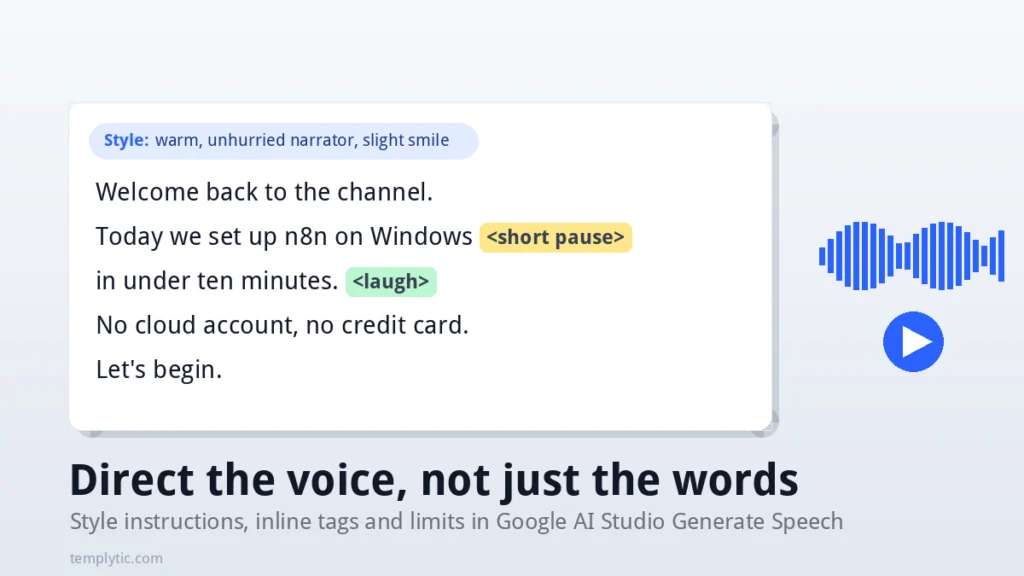
The Generate Speech tool in Google AI Studio will read any script in a pleasant default voice. Getting it to read the script the way you hear it in your head is a different job, and most of the frustration people report (“it ignored my stage direction”, “it read the brackets out loud”, “the pause is in the wrong place”) comes from putting an instruction in the wrong box. This guide explains the three places you can control delivery, what each one accepts, the limits you will hit, and what Google’s terms say about using the audio commercially.
Quick Answer
Mood, pace and persona for the whole clip go in the style instructions field in plain English (“calm, slow, slight smile”). One-off events go inline in the script as angle-bracket tags: <short pause>, <laugh>, <sigh>, <gasp>, <cough>. The script box is a verbatim transcript: anything else you type there gets spoken. Emphasise a word by writing it in CAPITALS.
Key Takeaways
- Three control surfaces: the style field (turn-level), inline tags (point-in-time) and the voice itself (timbre). Use them in that order when something sounds wrong.
- Google’s own examples for the style field: “cheerful and friendly”, “calm and relaxed”, “whispered urgently”, “warm and enthusiastic”, “speaking rapidly”, “speaking slowly”.
- Single-request multi-speaker supports two prebuilt voices; designed or replicated voices must be synthesised turn by turn.
- Inside AI Studio the tool is free; limits are per project, shown in the interface, and reset daily. Over the API, audio is billed at 25 tokens per second.
- Outputs carry a SynthID watermark. Commercial use is governed by the Gemini API terms; free-tier inputs and outputs may be used to improve Google’s products outside the EEA, UK and Switzerland.
The three places you control delivery
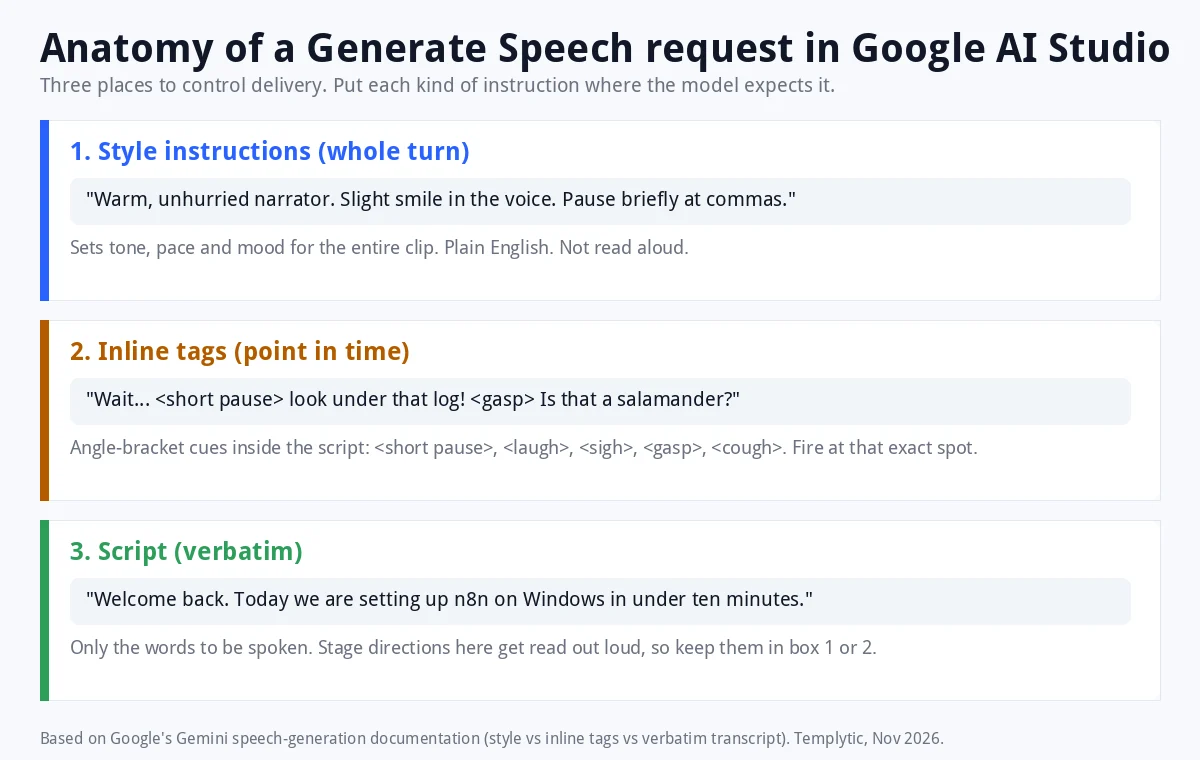
1. Style instructions: the whole turn
This is the field above the script in AI Studio (and speech_metadata.style in the API). It accepts a short plain-English direction that applies to everything in the turn. Google’s documentation gives these as examples:
- Mood: “cheerful and friendly”, “calm and relaxed”, “warm and enthusiastic”
- Intensity: “whispered urgently”
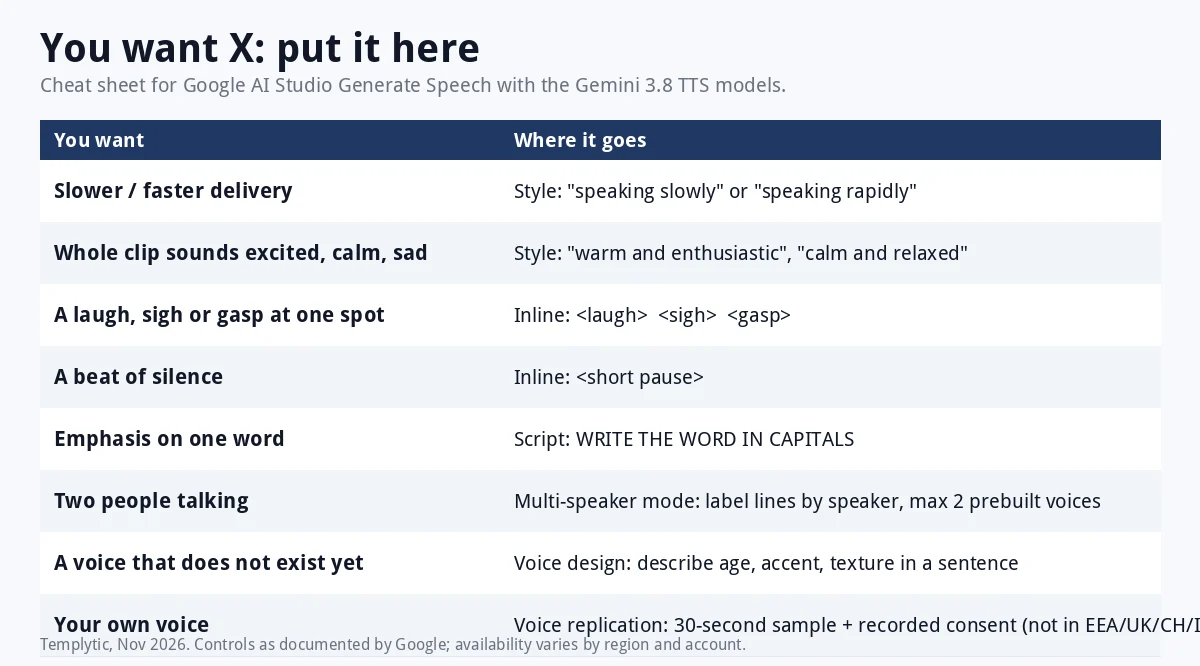
- Pace: “speaking rapidly”, “speaking slowly”
Short beats long. Two or three adjectives and one pace word usually outperform a paragraph of direction, because the model weighs every word you give it. Describe the result you want to hear, not the backstory of the character.
2. Inline tags: one moment in the script
For something that should happen at an exact point, put an angle-bracket tag in the script where it belongs. Google documents <short pause>, <gasp>, <laugh>, <sigh> and <cough>, and the 3.8 announcement adds <laughs> as a variant. Google’s own example:
Wait... <short pause> look under that fallen log! Is that a blue-spotted salamander?
Two more cues from the documentation: write a word in CAPITALS to emphasise it, and wrap a backchannel in pipes, as in |oh really?|, to get an overlapping “mhm”-style reaction; Google notes the pipe syntax works best with Gemini 3.8 Flash TTS.
3. The script: verbatim, nothing else
The script box is a transcript. If you type “(pause here)” or “[excited]” in it, the voice will say “pause here” and “excited”. Stage directions belong in the style field or in a documented tag. Punctuation still matters: a comma is a short breath, a full stop a longer one, an ellipsis a hesitation.
What goes where: cheat sheet
Style instruction patterns that transfer well
These are structures, not magic words. Combine one from each line and keep the total under a dozen words.
| Goal | Style instruction | Pair with |
|---|---|---|
| Tutorial narration | “clear, even, unhurried, friendly” | Charon, Iapetus; full stops between steps |
| Short ad | “upbeat and confident, speaking slightly rapidly” | Puck, Laomedeia; CAPITALS on the offer |
| Meditation / sleep | “calm and relaxed, speaking slowly, soft” | Achernar, Enceladus; <short pause> between sentences |
| Story with tension | “whispered urgently” | Algenib or Gacrux; <gasp> at the reveal |
| Testimonial | “warm and sincere, slight smile” | Sulafat, Achird; one <laugh> at most |
| Two-host podcast | Host: “firm, measured”. Guest: “casual, curious” | Kore + Zubenelgenubi in multi-speaker mode |
Multi-speaker: two voices in one take
Switch the mode to multi-speaker and label each line with the speaker name you assign. In a single request, Google supports up to two prebuilt voices; a designed or replicated voice cannot be mixed in and must be generated turn by turn and assembled in an editor. Give each speaker its own style instruction; contrast (firm host, casual guest) keeps turns distinguishable even when the pitch is similar.
Limits you will hit
- Request size: the Gemini 3.8 Flash TTS model page lists an 8,192-token input cap per request. Long scripts should be split at scene or section boundaries and stitched afterwards.
- Speakers: two prebuilt voices per multi-speaker request.
- Saved custom voices: 200 per project, expiring one year after last use; stateless voice keys last seven days.
- Free usage in AI Studio: Google does not publish fixed free-tier numbers for the TTS models. Limits are applied per project, shown inside AI Studio, and reset daily; preview models get tighter limits. If a run fails with a quota message, wait for the reset or attach a paid API key.
- Output format: downloads are WAV, 24 kHz mono 16-bit. There is no MP3 option in the tool; convert in any editor if a platform needs MP3.
- Replication regions: not available through AI Studio in Illinois, Texas, the EEA, the UK, Switzerland and India.
Commercial use and disclosure
Three things decide whether a clip is safe to use in client work.
- Terms. Use of the tool and its output is governed by the Gemini API Terms of Service and the usage policies they reference. Read the current version for your account type (free, paid, Workspace) rather than relying on a summary, including this one.
- Data use on the free tier. Google states that inputs and outputs on the free tier may be used to improve its products and may be reviewed by humans, except for users in the EEA, Switzerland and the UK. Do not paste confidential scripts into a free project.
- Watermark and disclosure. Every clip carries a SynthID watermark and replicated voices carry C2PA credentials. Platforms such as YouTube require disclosure when realistic synthetic audio could be mistaken for a real person; our Veo 3 guide covers YouTube’s disclosure rules in detail.
Never replicate a voice without the speaker’s recorded consent; the tool requires it, and so do most jurisdictions.
Frequently Asked Questions
Where do I type style instructions in Google AI Studio?
In the style field above the script on the Generate speech page. In the API it is speech_metadata.style. It applies to the whole turn; use inline angle-bracket tags for single moments.
Why does the voice read my brackets out loud?
The script box is a verbatim transcript. Only documented angle-bracket tags such as
Is there a limit on how much text I can generate?
The Gemini 3.8 Flash TTS model page lists an 8,192-token input cap per request. Free usage in AI Studio is limited per project with limits shown in the interface and reset daily; Google publishes no fixed free-tier number.
How do I slow the voice down?
Add “speaking slowly” to the style instruction. For a single beat, insert
Can I use AI Studio voiceovers in a YouTube video I monetise?
Use is governed by the Gemini API terms for your account type. The audio is watermarked, and YouTube requires disclosure when realistic synthetic content could be mistaken for a real person. Check the current terms before relying on it for client work.
Can I download an MP3?
The tool outputs WAV (24 kHz, mono, 16-bit). Convert to MP3 in any audio or video editor if a platform requires it.
Conclusion
Treat the style field as the director, the inline tags as the moments, and the script as the lines. When a take is wrong, change one of the three and regenerate; changing all three at once hides what fixed it. For choosing the voice itself, see every AI Studio voice compared, and for the end-to-end workflow, the voiceover guide.
Sources
- Gemini API: Speech generation (style field, inline tags, multi-speaker limits, output formats, voice TTLs)
- Google: Gemini 3.8 Flash TTS announcement (stage directions, non-verbal tags, replication consent and regions, SynthID, C2PA)
- Gemini API models page (model status)
- Gemini API pricing (token billing, free tier)
- Gemini API Terms of Service
Last Updated on November 8, 2026 by Caleb Brooks

Comments