
Quick answer. Choose Hostinger Premium for a first WordPress blog or a small business site you update occasionally. Choose Unlimited if you publish most days or manage several sites and want daily backups. Cloud Startup makes sense when a busy site needs more processing power. A VPS is for projects where you need to install and manage your own server software.
What is Hostinger’s Black Friday offer for 2026?
Hostinger advertises up to 85% off selected US hosting plans for Black Friday. Its campaign runs from October 19 through December 14, 2026. On November 27, Premium was $1.99 per month for 48 months, or $95.52 paid upfront before tax. It renews at $10.99 per month for the same term.
Unlimited was also 85% off and Cloud Startup was 71% off on the 48-month offer. If you already have hosting, check your account for upgrade offers. The prices below apply to a new subscription’s first term.
Referral disclosure. If you buy an eligible plan through one of my links, I may earn a reward. The prices shown are the advertised sale rates. Your checkout will show whether a referral discount applies.
See Hostinger’s Black Friday offers
Hostinger plans and prices at a glance
The three managed plans use a 48-month term. The entry-level VPS uses a 24-month term. You pay for the full term at checkout. All figures are in US dollars before tax. Each plan link opens Hostinger’s offer page, where you can select a plan and billing term.
| Plan | Intro rate per month | First payment | Renewal rate per month |
|---|---|---|---|
| Premium | $1.99 | $95.52 for 48 months | $10.99 |
| Unlimited | $2.79 | $133.92 for 48 months | $16.99 |
| Cloud Startup | $7.99 | $383.52 for 48 months | $25.99 |
| KVM 1 VPS | $6.49 | $155.76 for 24 months | $11.99 |
Hostinger quotes the renewal rates above for the same term. For example, another 48 months of Premium at $10.99 per month would cost $527.52 before tax. Your country, billing term and promotion can change the price.
Is Hostinger Premium enough for a WordPress site?
For a portfolio, a local business site or a blog you update once a week, Premium is a good starting point. It covers three websites, 20 GB of SSD storage and weekly backups. A photographer with a portfolio and a separate booking site can put both on this plan. The two sites share the 20 GB, so check the size of your photo library before moving it.
The backup schedule matters if you edit often. Imagine that your last backup ran on Sunday. If a plugin update breaks your site on Friday, restoring Sunday’s copy could mean recreating the pages you wrote during the week. If that would cost you hours, compare Unlimited before you buy.
When is Unlimited worth the extra money?
Unlimited adds daily backups, 50 GB of NVMe storage and a content delivery network (CDN). A CDN keeps copies of files such as images closer to visitors. For someone updating several WordPress sites, the most useful upgrade may be having a fresh restore point each day.
At the prices above, Unlimited costs $38.40 more than Premium for the entire first four years. After renewal, the difference rises to $6 per month, or $72 per year at those rates. That makes daily backups an inexpensive upgrade during the first term. The renewal price deserves a second look if you only have one quiet site.
Hostinger advertises unlimited websites, subject to fair use. Those sites still share 50 GB of storage, two CPU cores and 3 GB of memory. If you already have a Business subscription, check its details in your dashboard. Hostinger now sells Unlimited in its place on most web hosting pages, and existing Business customers keep their plan and limits.
When should you move to Cloud Startup?
Consider Cloud Startup when your store slows down during busy periods and your hosting dashboard shows that you repeatedly reach a resource limit. It includes four CPU cores, 4 GB of memory, 100 GB of NVMe storage and 100 PHP workers. Those workers handle simultaneous requests, such as customers loading their carts. You also get daily and on-demand backups.
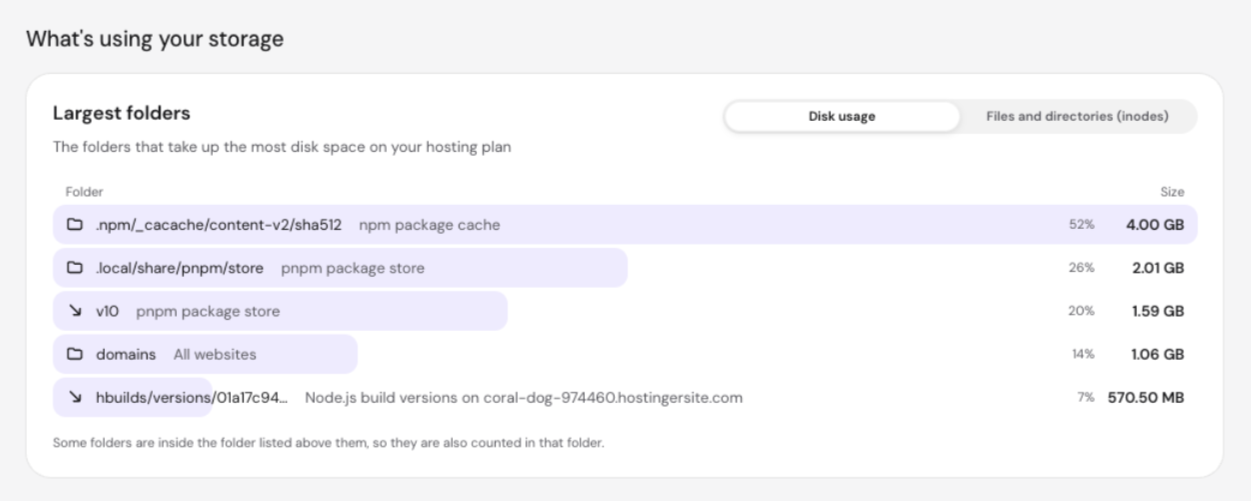
Pro tip. Before upgrading, open Websites → Manage site → Hosting plan → Resources Usage. Compare CPU and memory use with the times your site slowed down. If storage is the issue, look at the largest folders. A folder full of old site exports calls for a different fix than a checkout that regularly runs out of workers.
Should you choose cloud hosting or a VPS?
For a growing WooCommerce store, choose managed cloud hosting if you want more room for customers while Hostinger manages the server. Choose a VPS if your project needs root access, which lets you install system software and change the server configuration. A developer running a custom app in Docker has a concrete reason to choose a VPS.
Hostinger’s entry-level KVM 1 includes one virtual CPU, 4 GB of RAM and 50 GB of NVMe storage. Its advertised price is lower than Cloud Startup’s, but its 24-month term and self-managed setup are different. Someone on your team needs to handle operating system updates, configure access and know how to restore the app.
What else will you pay for after the first year?
The managed offers in the table include an eligible domain for the first year. Email is also included for one year. Premium includes two mailboxes per website. The two higher tiers offer unlimited mailboxes during that period, subject to fair use. Check the renewal price of your chosen domain extension and mailbox service separately. Your four-year hosting payment can be fully covered while a domain renewal is already due.
Key takeaways
- For a first site, Premium keeps the upfront bill under $100 at the checked US price. Make sure a weekly restore point suits your publishing schedule.
- For several active sites, Unlimited adds daily backups. Check the combined storage use of all the sites you plan to move.
- For a busy store or custom app, use the job to choose. Repeated resource limits point toward managed cloud hosting. A specific need for server-level control points toward VPS.
View Hostinger plans with my referral link
Last Updated on November 27, 2026 by Logan Carter

Comments