

Gemini 3 Pro is built to make AI feel less like a chatbot and more like a working assistant. Instead of only returning text, it can generate app prototypes, build interactive search experiences, create research-backed drafts, and help with workspace tasks. For teams, creators, founders, and knowledge workers, the biggest value is speed: you can move from an idea to a usable first draft much faster.
Quick Answer
Gemini 3 Pro introduces four core capabilities: text-to-app generation, generative UI, interactive search simulations, and autonomous workspace agents. These tools help you build functional software drafts, research with interactive data, and automate administrative tasks directly within your existing workflow.
Key Takeaways
- Gemini 3 Pro focuses on interactive work, not only written answers.
- Anti-Gravity can turn short prompts into working app prototypes.
- Generative UI can make search results more visual, adjustable, and useful.
- Agent Mode can help with Gmail, Calendar, and Drive tasks when permissions are enabled.
- AI-generated apps, slides, stats, and citations still need human review before business use.
Four features that change how AI helps you
Google released a suite of capabilities for Gemini 3 Pro that moves AI beyond simple text responses toward interactive work. These four features stand out:
- Text-to-App (Anti-Gravity): Build functional apps from a single sentence.
- Generative UI: Access interactive, adaptive interfaces instead of static text.
- AI Search Mode: Use intelligent conversations featuring live simulations.
- Agent Mode: Execute end-to-end tasks within your Google Workspace.
The text-to-app builder carries significant potential to disrupt existing productivity tools by turning requirements into working applications in seconds. The main benefit is not that every output will be production-ready. The benefit is that teams can test ideas, review layouts, and validate workflows before investing more time in full development.
Landing pages: prototypes that understand your brand
Ask Gemini to create a landing page for a specific startup, such as an ed-tech company, in a defined design style like Neo-Brutalism. You receive a full hero section, layouts, and branding elements that match your prompt.
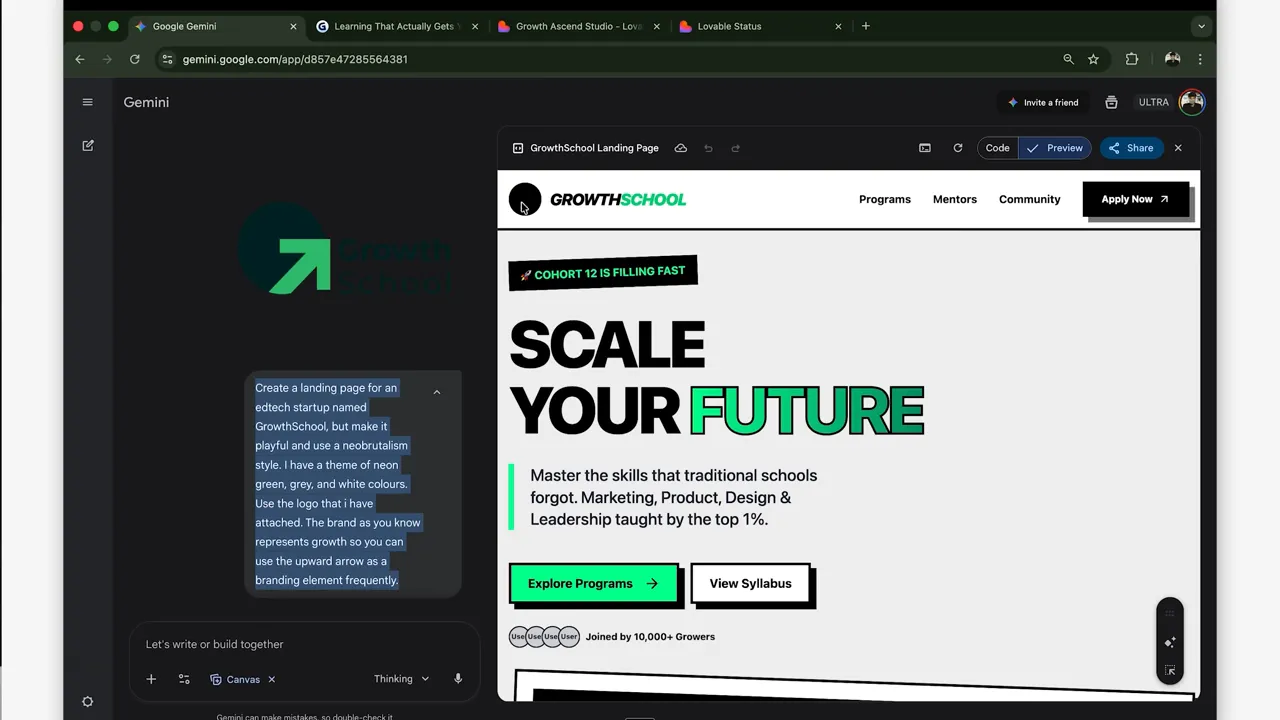
Gemini often retrieves real company taglines from public sources when your prompt lacks specific details. While logo uploads sometimes fail, the system consistently implements design styles and requested motifs. Rapid, brand-aware prototypes allow you to iterate design and copy without waiting for designers.
Pro Tip: Give Gemini a specific audience, brand tone, color direction, and conversion goal. A prompt such as “create a landing page for busy parents who need a safer stroller comparison tool” will usually produce a more focused result than a vague request like “make a homepage.”
Pitch decks: slides that research for you
Gemini 3 Pro generates a seven-slide pitch deck including technical specifications, benchmarks, and use cases. The tool attaches sources and image citations to support its claims.
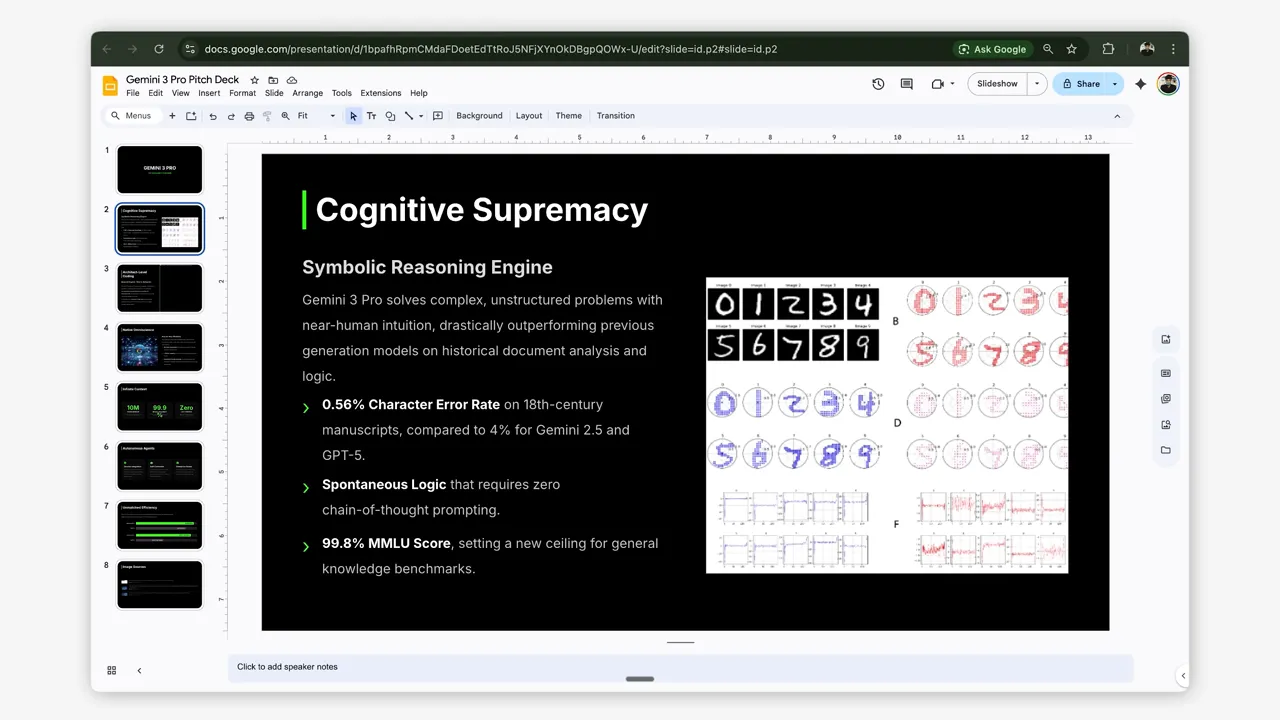
This specificity is powerful but requires manual verification. Gemini generates concrete-seeming metrics, such as specific MMLU scores or error rates. Always validate technical statistics before sharing them with stakeholders. Use these generated decks as well-researched first drafts to save time.
Warning: Do not send an AI-generated pitch deck to investors, clients, or leadership without checking every number, chart, citation, and screenshot. Treat the first version as a draft, not a final business document.
Agent Mode: an autopilot inside your Google Workspace
Agent Mode links directly to Gmail, Calendar, and Drive. With your permission, it performs several tasks:
- Search unread emails and draft replies.
- Find meeting requests and add them to your calendar.
- Compile reports from documents pulled directly from your Drive.
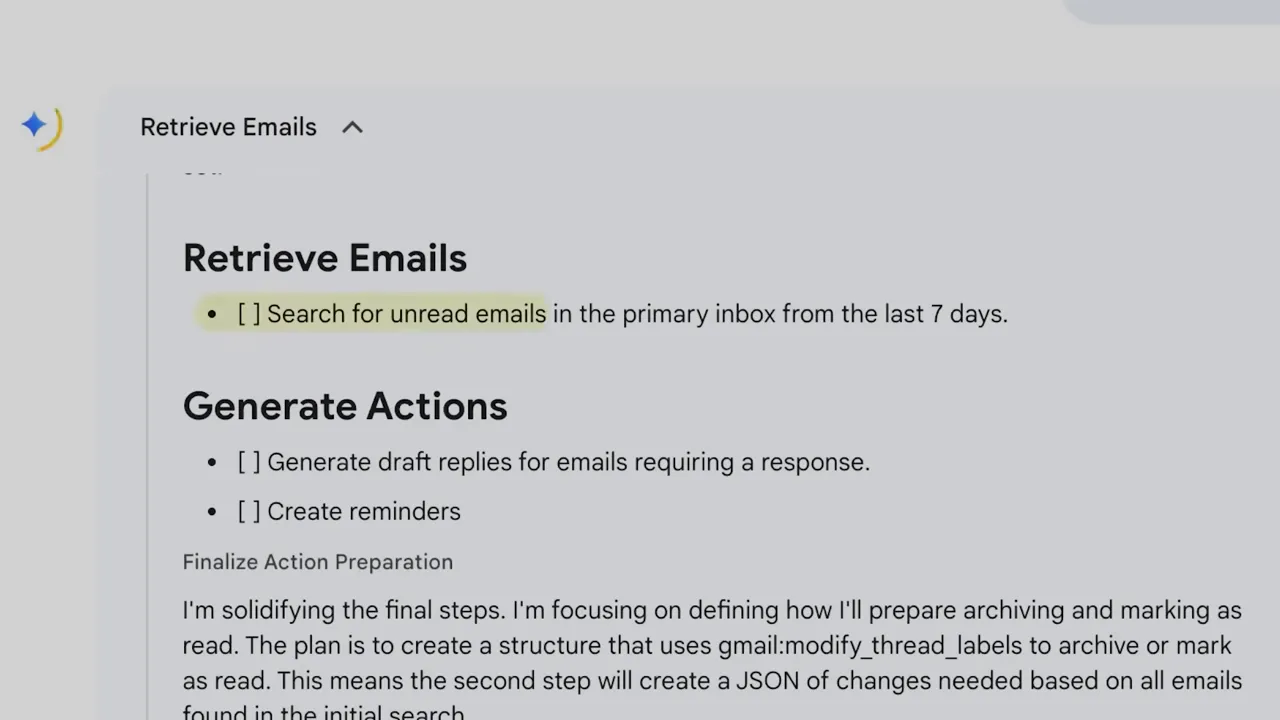
Agent Mode shifts busywork to an autonomous assistant. Because the system accesses your private files, enforce strict permission controls and audit your logs regularly. Always review agent outputs before sending or taking action.
Note: Workspace agents are most useful for repeatable administrative work. They are less suited for sensitive decisions that need judgment, legal review, financial approval, or confidential handling without human oversight.
AI Search Mode: interactive answers and simulations
AI Search Mode pairs search results with generative UI to provide more than just text. You can explore topics through interactive simulations:
- Manipulate the three-body problem to see how objects move in real time.
- Use loan-comparison tables that recalculate monthly payments when you change interest rates.
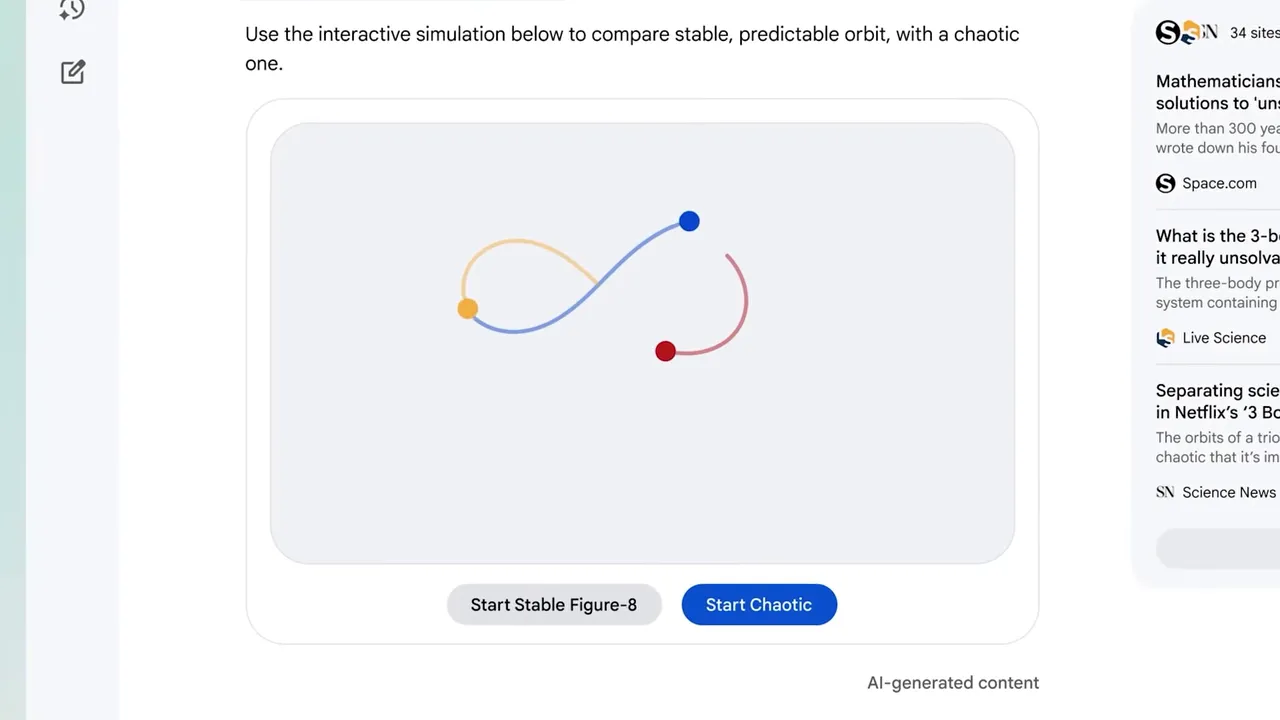
This turns search into a hands-on exploration tool. You interact with a mini-app that answers your question visually. For learning, planning, and comparison tasks, this can be easier than scanning a long static answer.
The biggest shift is not only faster answers. It is the move from reading AI output to interacting with AI-generated tools.
Anti-Gravity: building working apps from text
Anti-Gravity transforms a prompt into a functioning web application. Describe a flight lookup app and you receive:
- A user interface with inputs and search buttons.
- Connected API calls that provide data.
- Working forms without manual coding.
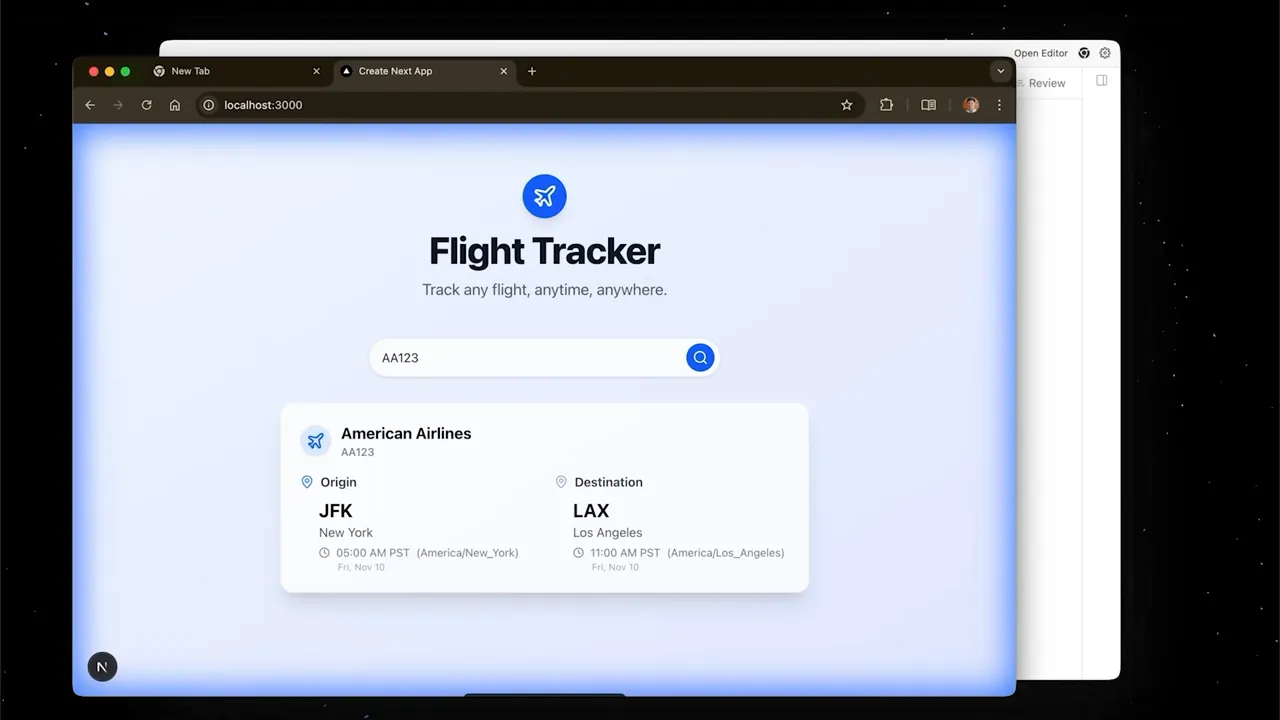
This feature creates internal dashboards and proofs-of-concept in seconds. It lowers the barrier for teams that need functional tools without hiring external developers. For example, a marketing team could prototype a campaign tracker, a founder could test a lead-capture tool, or an operations manager could build a simple internal request form.
Practical workflows to try
- Product discovery: Generate landing pages to validate demand.
- Fundraising: Auto-generate pitch decks with cited sources.
- Finance: Create interactive loan comparators to analyze scenarios.
- Automation: Use Agent Mode to manage inboxes and meetings.
- Rapid tooling: Spin up internal dashboards using Anti-Gravity.
At a Glance
| Best Use | Prototyping, research drafts, interactive search, workspace automation, and internal tools |
| Skill Level | Beginner to advanced, depending on the task and review process |
| Human Review Needed | Yes, especially for statistics, citations, code, security, legal, and financial decisions |
| Main Risk | Overtrusting polished AI output before checking accuracy, permissions, and compliance |
Limitations and precautions
These systems require human oversight to maintain accuracy and security:
- Accuracy: Verify specific metrics or claims, as AI models can hallucinate data.
- Assets: Check image and logo quality because uploads sometimes fail.
- Security: Manage permissions carefully for any agent with file access.
- Compliance: Confirm that generated apps meet legal requirements before use.
Always consult a qualified professional before making business decisions based on automated data. This matters most when the output affects hiring, finance, health, safety, legal compliance, privacy, or customer data.
Getting started with Gemini 3 Pro
Gemini 3 Pro turns AI into a platform that designs, builds, and executes tasks. Start using these features to accelerate your prototyping process today. You should prioritize human oversight for all sensitive compliance and accuracy tasks. Integrating these tools responsibly will save time and reduce your administrative burden.
A simple way to begin is to test one low-risk workflow. Ask Gemini to create a landing-page draft, summarize a document, build a simple calculator, or prepare a meeting follow-up. Review the output carefully, note what it handled well, and then decide whether the workflow is safe enough to repeat.
Frequently Asked Questions
What is Anti-Gravity?
Anti-Gravity is a text-to-app tool that builds web applications from a single sentence. It generates the UI, logic, and API integrations needed for working prototypes.
How does Generative UI change search?
Generative UI creates interactive interfaces and simulations instead of only text. This allows you to manipulate data visually rather than reading static explanations.
What can Agent Mode do?
Agent Mode accesses Gmail, Calendar, and Drive to draft replies, schedule meetings, and create reports. It performs tasks end-to-end within your workspace when you allow the needed permissions.
Are AI metrics trustworthy?
AI often generates specific metrics, but these can be inaccurate. Use all AI-generated citations and stats as starting points for your own research, not as final proof.
Will this replace developers?
These tools shift the nature of work but do not replace the need for governance or complex engineering. They excel at rapid prototyping and small-scale internal tools, while production systems still need testing, security checks, and experienced review.
Sources
- Google Gmail — supports the Gmail workspace reference used in the Agent Mode section.
- Google Workspace Security — supports the recommendation to manage permissions and review workspace access carefully.
- The Verge on Google Anti-Gravity — supports the discussion of Anti-Gravity as a Gemini-related coding and app-building tool.
Last Updated on June 27, 2026 by Logan Carter

