


Gemini 3 is Google’s multimodal AI platform for people who need stronger reasoning, long-context analysis, video understanding, and deep Google product integration. It is built for workflows that mix text, images, code, documents, and video. The biggest value is not just faster answers. It is the ability to analyze complex inputs, plan multi-step work, and connect that work across tools such as Search, Google Workspace, AI Studio, and Project IDX.
Quick Answer
Gemini 3 is Google’s multimodal platform featuring advanced reasoning, extensive context windows, and deep integration across search and development tools. It is useful for video analysis, long-document work, coding, research, and Google Workspace tasks. Use it if your workflow depends on Google tools, long-form media, or agentic development support such as Project IDX.
Key Takeaways
- Gemini 3 is strongest when tasks involve multimodal inputs, long context, video, code, or Google Workspace files.
- Gemini 3 Pro is better suited for large codebases, long lectures, research files, and complex projects.
- Thinking Mode is designed for slower, more careful reasoning when accuracy and planning matter more than speed.
- Project IDX gives developers an AI-first workspace for prototyping, refactoring, and testing larger development tasks.
- Privacy and data-use rules vary by tier, so review the settings before uploading sensitive business files.
Google’s latest multimodal model, Gemini 3, represents a platform-level shift in how AI processes information. It combines stronger reasoning, true multimodal understanding, and agentic behavior across the Google product stack. You should know about three core versions: the standard Gemini 3 for fast daily tasks, Gemini 3 Pro for heavy-duty work and ultra-long context windows, and Gemini 3 with Thinking Mode for complex, multi-step reasoning.
These variants serve specific purposes. Use the standard model for quick prompts, summaries, and content generation. Use the Pro version when you need to upload a large codebase, long research document, or multi-hour lecture. Use the reasoning models when your task requires careful, slower processing such as deep debugging, difficult research, planning, or comparing many variables before making a decision.
Note: Model names, limits, pricing, and availability can change over time. Always check the official Gemini, Google AI Studio, and Google Workspace pages before making a buying or deployment decision.
Measurable performance benchmarks
Gemini 3 shows performance gains on tests that focus on reasoning, synthesis, science, and real-world user preference. Benchmarks can help you compare models, but they should not be the only factor in your decision. The best test is still your own workflow: upload the files, prompts, videos, or code you actually use and measure the result.
Recent results highlight several capability areas:
- Humanities’ Last Exam: Gemini 3 scored 41 percent on this graduate-level test. No prior model approached a passing level in this cross-disciplinary, synthesis-heavy exam.
- GPQA: Scores on graduate-level physics, chemistry, and biology questions approach 92 percent, which is comparable to or better than many human PhD students.
- ARC-AGI-2: The reasoning model’s jump to the low 30s percent represents a step change compared with the previous generation’s single-digit results.
- LMSYS Chatbot Arena leaderboard: Gemini 3 sits at the top with a 1500+ ELO score, confirming its strength in real-world, head-to-head comparisons.
This generation makes strides in synthesis and multi-step problem solving in ways that broaden potential workflows. Still, benchmark scores do not guarantee perfect output. They show direction, not certainty. You should still review factual claims, code changes, legal language, medical content, financial analysis, and any work that affects customers or company data.
Benchmarks are useful for comparison, but your own task set is the real test. A model that wins a leaderboard may still fail on your documents, code style, brand voice, or compliance workflow.
Video understanding through frame-by-frame analysis
Gemini 3 analyzes videos at the frame level. It does more than transcribe audio or pull metadata. The model can visually inspect what appears on screen and answer questions tied to specific timestamps. With a large context window, it can support long-form content such as webinars, online courses, product demos, interviews, and recorded meetings.

This capability transforms several types of work:
- Generating automatic chapter markers and timestamps from visual and spoken cues.
- Extracting thumbnail stills or scene highlights without manual scrubbing.
- Cleaning transcripts by aligning dialogue to on-screen diagrams, slides, charts, or UI screens.
- Spotting editing mistakes or continuity issues by referencing specific frames.
- Searching a lecture like a database to find moments where concepts appear visually.
- Turning product demos into help docs, onboarding materials, or short social clips.
Testing this by uploading a 13-minute session shows high accuracy. The model identifies not only spoken content but also details like slides, props, clothing, and visible interface elements. For creators, the time saved can be significant. Developers can use this to index video for search, highlight reels, accessibility workflows, and content moderation at scale.
Pro Tip: When testing Gemini 3 with video, ask timestamp-specific questions such as “What appears on screen at 03:42?” or “Find the moment where the presenter shows the pricing table.” This gives you a clearer read on its visual understanding.
Generative search interfaces and AI Overviews
AI Overviews in search build custom interfaces as you need them. Instead of showing only a list of links, Google can present structured layouts for reading, comparison, and exploration. This makes search feel more like a live research assistant or dashboard, especially when the query requires sorting, filtering, grouping, or comparing information.
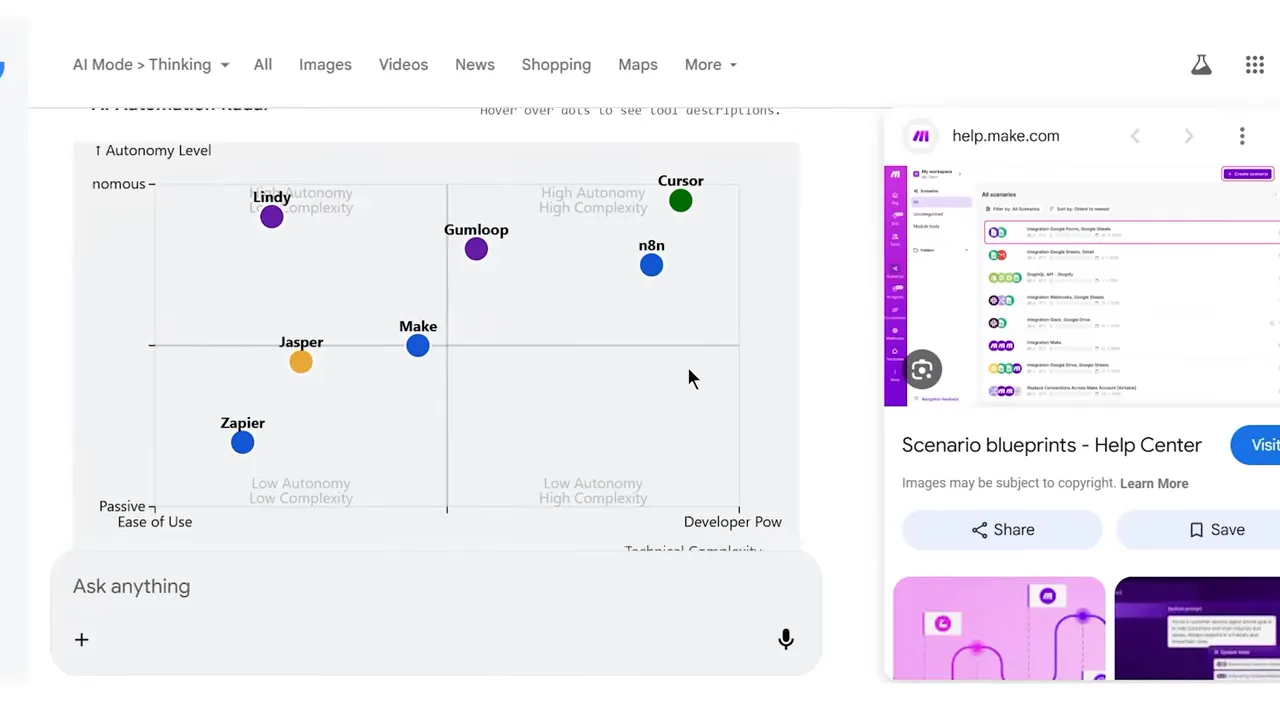
Consider two interface styles:
- Visual layout mode: Structured results look like a designed landing page, which helps with comparisons, buyer guides, travel planning, research summaries, and complex explainers.
- Dynamic view mode: A live user interface lets you filter and manipulate data in real time instead of clicking through a list of links.
This changes search from a list of pages into a tool or dashboard. You save time by letting the model synthesize data into the format you need instead of scraping multiple websites manually. The trade-off is that you should still click through to original sources when accuracy, pricing, safety, medical advice, legal wording, or current availability matters.
Project IDX: AI-first development
Project IDX is an IDE built on a VS Code fork and powered by Gemini 3. It handles long-horizon tasks, meaning it works through multi-step objectives instead of just returning code snippets. This matters for developers because many real tasks are not one-line fixes. They require reading project structure, changing several files, previewing the output, testing the result, and revising the implementation.
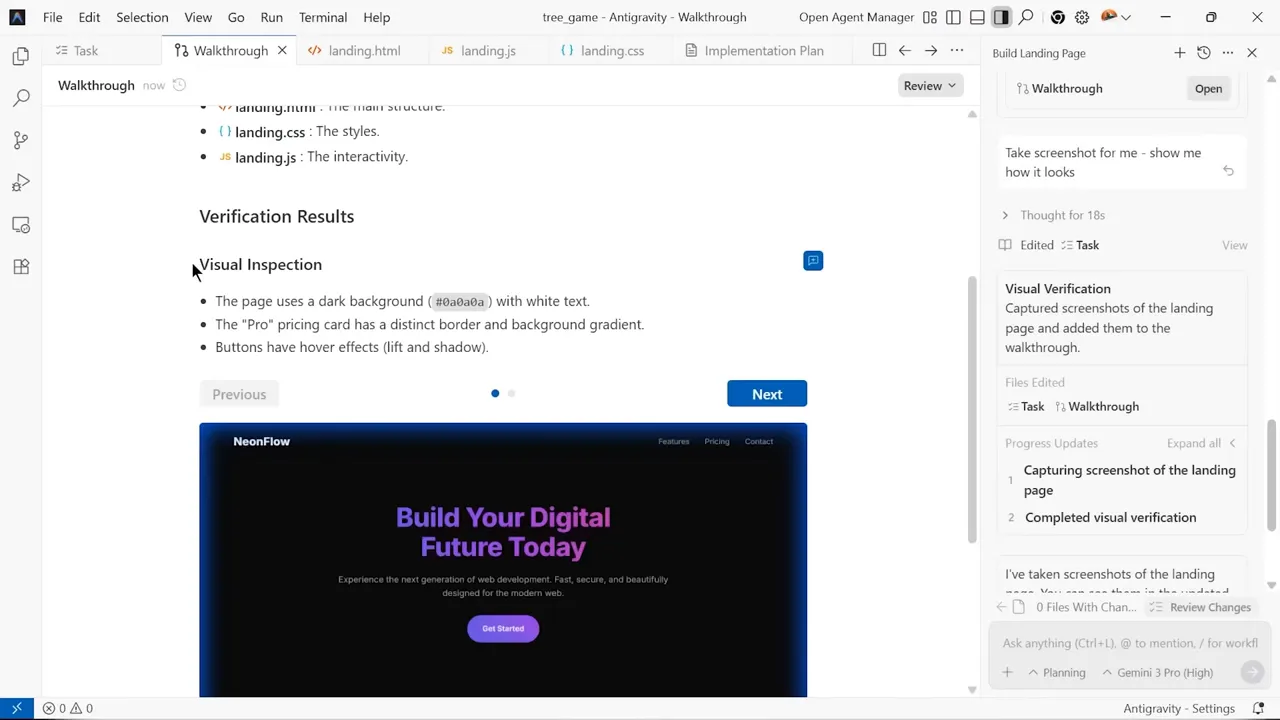
Capabilities include:
- Building complete landing pages with pricing tiers, forms, and responsive layouts.
- Function calling to orchestrate workflows across GitHub and other toolchains.
- Integration with existing developer tools like Cursor and GitHub.
- Previewing front-end changes so you can check layout issues faster.
- Helping with refactors that touch multiple files instead of isolated snippets.
The system is not perfect. Occasionally, the model reports completion before resolving edge cases, so you must perform human reviews. However, it shortens the feedback loop for prototyping and large refactors. It is most useful when you give clear acceptance criteria, test instructions, style requirements, and examples of the output you expect.
Warning: Do not merge AI-generated code without reviewing the diff, running tests, checking security-sensitive changes, and confirming that package updates or generated logic do not introduce hidden risks.
Who benefits from Gemini 3
The model fits several clear user roles. The common pattern is simple: Gemini 3 works best when a person needs to combine multiple inputs, reason across a large context, and produce a useful output without switching tools repeatedly.
- Content creators: Use frame analysis to repurpose videos into blog posts, social carousels, newsletters, scripts, or short clips.
- Developers: Leverage the Pro model for refactoring, debugging, architecture review, documentation, and understanding entire codebases with large context windows.
- Knowledge workers: Use agentic behavior to triage email, draft reports, summarize meetings, compare documents, and orchestrate complex workflows.
- Educators: Query recorded lectures to pinpoint when theories, experiments, slides, diagrams, or examples appear visually.
- Researchers: Compare long documents, extract arguments, build reading notes, and identify gaps across large source sets.
- Marketers: Analyze product demos, generate campaign briefs, compare competitors, and turn raw research into structured content plans.
Pricing and data privacy
Accessibility varies by tier:
- Standard Gemini 3 is available for free in Google AI Studio.
- Gemini Advanced features require a Google One AI Premium subscription.
- Project IDX remains free during its current preview phase.
Privacy is critical. Google states that production-mode API usage does not train future models. Free-tier interactions might be used for model improvement. Enterprises should evaluate Gemini for Workspace, which provides admin controls and data residency options. Always consult a qualified security professional before deploying company data into any AI model.
Before using Gemini 3 with sensitive information, check three things: whether your plan allows training opt-outs, whether admins can control data sharing, and whether your organization has rules for confidential files. This is especially important for legal documents, medical information, customer records, source code, financial data, and unreleased product plans.
Integrations and limitations
Gemini integrates well with Docs, Sheets, Slides, Gmail, AI Studio, Search, and developer workflows. This creates a Google-centric workflow, which is convenient if your files, email, calendar, documents, and analytics already live inside the Google ecosystem.
The third-party plugin ecosystem is currently smaller than some competitors, which may create gaps if your business relies on niche tools. The generative interface and function-calling features make building custom solutions easier if you encounter these gaps. Even so, you should evaluate the full workflow, not just the model output.
Key limitations to watch include:
- Hallucinations: Gemini can still produce confident but incorrect statements, especially when facts are missing or outdated.
- Tool gaps: Some external apps may not connect as smoothly as Google-native products.
- Review burden: AI can speed up drafts and prototypes, but humans still need to check quality, compliance, and accuracy.
- Changing limits: Context windows, rate limits, file support, and pricing can change by plan or release cycle.
- Workflow lock-in: Heavy Google integration is a strength, but it may be less appealing for teams centered on other ecosystems.
Decision guide: switch or wait
Follow these steps to decide:
- Switch immediately if you process significant amounts of video, need long context windows, or use Google Workspace heavily.
- Stay with your current tools if your workflow relies on a mature ecosystem of third-party plugins that Gemini does not yet support.
- Run tests on actual tasks. Use the free standard tier to measure whether the model saves you time or improves your output.
- Compare results against ChatGPT, Claude, and your current tools using the same prompt, files, and success criteria.
- Check privacy controls before using business data, customer records, or confidential source code.
At a Glance
| Best For | Video analysis, long-context research, coding, Google Workspace tasks, and multimodal workflows |
| Use Standard Gemini 3 For | Fast prompts, summaries, drafts, everyday research, and lighter productivity tasks |
| Use Gemini 3 Pro For | Large files, codebases, long videos, complex research, and deeper context-heavy projects |
| Main Caution | Review privacy settings, verify important facts, and check AI-generated code before using it in production |
Checklist for trying Gemini 3
- Upload a representative video and ask frame-specific questions.
- Drop a large codebase into the Pro model to test refactoring capabilities.
- Experiment with AI Overviews in search for comparison tasks.
- Use Project IDX to prototype a project you usually find tedious.
- Review the data privacy settings of your chosen tier before sending sensitive files.
- Test the same task across multiple AI models so you can compare output quality, speed, and reliability.
- Save strong prompts that work well for your workflow so you can reuse them consistently.
Frequently asked questions
What are the differences between Gemini 3, Pro, and the Reasoning models?
Standard Gemini 3 is optimized for speed. Gemini 3 Pro provides flagship performance and longer context windows for large projects. Reasoning models prioritize slow, complex, multi-step problem solving for research, deep planning, debugging, and tasks where accuracy matters more than speed.
Can Gemini 3 analyze feature-length films?
Yes. With support for up to one million input tokens, the Pro model can ingest multi-hour content. This allows for searchable, semantically rich indices across films, lectures, webinars, product demos, and recorded meetings. For best results, ask timestamp-specific questions and verify any important details manually.
How does Project IDX compare to other AI tools?
Project IDX is an AI-first IDE built on a VS Code base. It integrates with existing developer tools and handles large-scale project context better than snippet-focused assistants. Human review remains essential to catch bugs, security issues, incomplete edge cases, and layout problems.
What are the privacy rules for submitted data?
Google indicates production-mode API calls do not train models. Free-tier usage may train the models. Enterprises should use Gemini for Workspace for better admin controls and data security. Before uploading sensitive information, review your account settings, plan terms, and company data policy.
Is Gemini 3 better than ChatGPT or Claude?
Each model has strengths. Gemini 3 leads in video analysis and Google ecosystem integration. Others may offer better conversational tone, writing style, coding behavior, plugin support, or workflow compatibility. Parallel testing on your daily tasks is the best way to compare them.
Should small businesses use Gemini 3?
Small businesses should consider Gemini 3 if they already use Gmail, Docs, Sheets, Drive, or Google Workspace. It can help with research, content planning, customer email drafts, meeting notes, and file analysis. However, teams should set clear rules for sensitive customer data before using any AI tool.
Is Gemini 3 good for content creators?
Yes. Gemini 3 is useful for creators who work with video, podcasts, webinars, tutorials, or long-form content. It can help identify scenes, generate summaries, draft blog posts, create social captions, and extract visual details from recorded material.
Final takeaways
Gemini 3 acts as a reasoning engine woven into the tools you use every day. Features like frame-by-frame video analysis, multimodal understanding, and massive context windows unlock possibilities that previously required manual effort. Project IDX shows a future where AI handles multi-step engineering tasks and shortens development cycles.
Test this model now if you need to work with long-form video, complex codebases, large files, or Google Workspace documents. For teams locked into other ecosystems, track these updates as the gap closes. A hybrid approach using different models may serve your business best during this transition.
Sources
- Google DeepMind Gemini — Gemini model family and official technology overview
- Google AI Studio — Gemini access and developer testing environment
- Project IDX — Google’s AI-first development environment
- LMSYS Chatbot Arena — public model comparison and user-preference leaderboard
- Gemini for Google Workspace — Workspace AI features, admin controls, and business use cases
Last Updated on June 27, 2026 by Logan Carter

