


You spend hours each week copying details between apps, checking for new uploads, and rewriting the same updates for different platforms. Workflow automation tools help remove that manual work by connecting the apps you already use, then running repeatable steps in the background.
Quick Answer
Zapier is the better choice if you want fast setup, guided automation, and fewer technical steps. n8n is better if you want deeper control, self-hosting, custom logic, and more ownership over your workflow infrastructure. Choose Zapier for speed and n8n for flexibility.
Key Takeaways
- Zapier is easier for beginners because it handles many app connections, OAuth steps, and workflow setup details for you.
- n8n gives technical users more control over data handling, branching logic, custom nodes, and self-hosted infrastructure.
- For a YouTube-to-LinkedIn automation, Zapier is faster to launch, while n8n takes more setup but offers more customization.
- Pricing depends on task volume, hosting costs, maintenance time, and whether your team needs managed infrastructure or self-hosting.
- The best platform depends on your technical skill, compliance needs, workflow complexity, and long-term maintenance capacity.
This guide compares Zapier and n8n through a practical workflow: turning a new YouTube upload into a custom LinkedIn post. You will see how each platform handles triggers, AI writing, app authentication, posting, troubleshooting, and long-term workflow management.
How automation platforms function
Automation platforms connect the apps you already use so they can pass data to each other. Instead of copying data manually, a workflow watches for a trigger and runs the steps you define.
Think about common apps like Gmail, Google Sheets, Slack, YouTube, LinkedIn, and modern AI models. A single workflow can take input from a YouTube video and automatically:
- Save video details to a spreadsheet
- Send a notification to Slack
- Draft a social post using AI
- Publish that post to your account
- Log the result so you can confirm what happened later
The core goal is to replace repetitive, manual tasks with repeatable workflows so you can focus on work that needs judgment, strategy, or creativity.
Testing Zapier versus n8n
To see how Zapier and n8n perform, I built the same automation in both. The goal was simple:
- Detect a new YouTube upload
- Use AI to draft a LinkedIn post with the video link
- Publish the post to a personal LinkedIn profile
This scenario is realistic for creators, marketers, consultants, and small teams who want to repurpose content across channels. It also reveals how each platform handles AI integration, authentication, data mapping, testing, and the amount of technical work needed before the workflow is reliable.
At a Glance
| Best For | Zapier for fast no-code setup; n8n for technical control and custom workflows |
| Difficulty | Zapier: beginner-friendly; n8n: intermediate to advanced |
| Main Setup Work | Zapier uses guided app connections; n8n often needs API keys, OAuth setup, and node configuration |
| Cost Factors | Task volume, execution limits, hosting, maintenance, developer time, and support needs |
Building the workflow in Zapier
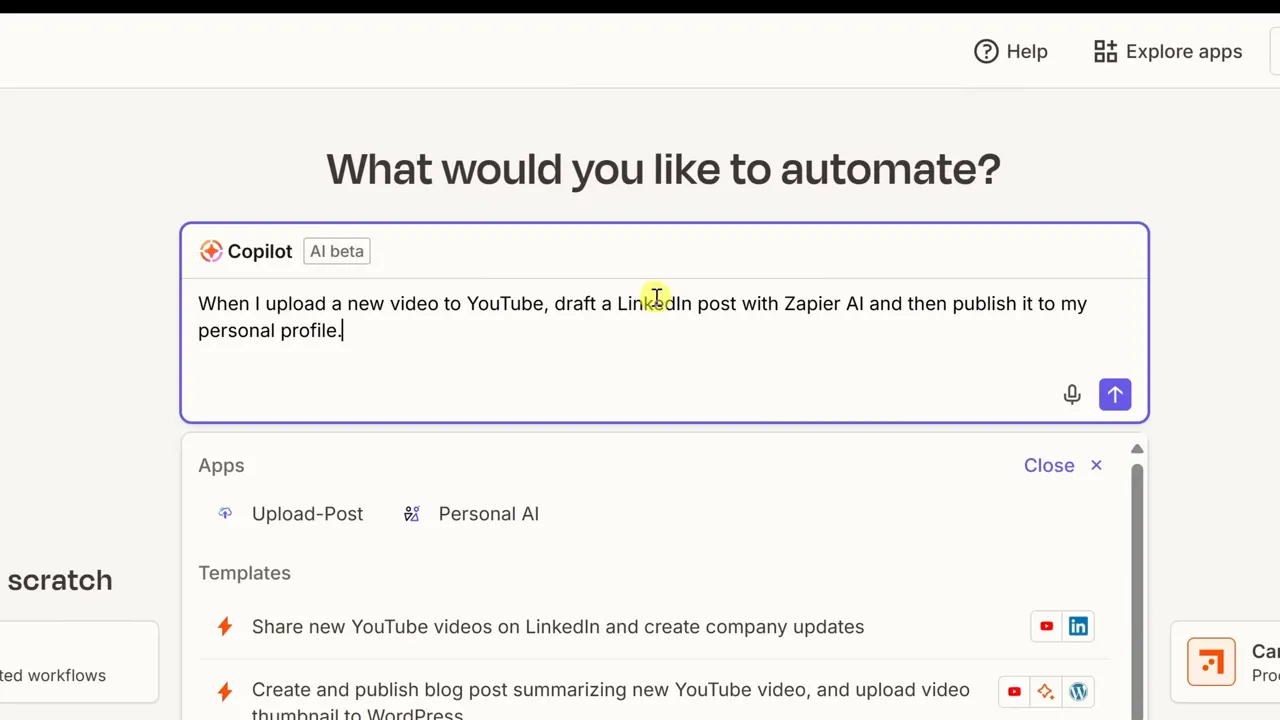
Zapier prioritizes speed and simplicity. I told Zapier what I wanted using the Copilot prompt, and it generated the flow automatically: YouTube trigger, AI generation, and LinkedIn publishing.
Zapier’s Copilot prompt box makes the setup feel like natural language programming. I typed a short sentence describing the automation, and it created a working outline within seconds.
Step-by-step setup in Zapier
- Enter your prompt in Copilot: “When I upload a new video to YouTube, draft a LinkedIn post with Zapier AI and publish it.”
- Review the generated Zap outline.
- Connect your Google account to allow YouTube access.
- Provide your YouTube channel ID to narrow the trigger.
- Choose the AI provider or use Zapier’s hosted AI.
- Review the autogenerated prompt that feeds the AI model.
- Connect LinkedIn and let Copilot fill the required fields.
- Test the Zap end-to-end and enable it.
The whole flow took minutes and required no code. Zapier handled the connection flow and app wiring, so you do not need to be a developer to get a useful automation running.

What I liked about Zapier:
- Copilot and pre-built integrations reduce setup friction.
- No manual API keys or developer console work for common app connections.
- Testing and publishing are beginner-friendly.
- Zapier maintains many connectors, so you spend less time worrying about API changes.
- The interface is clear enough for marketers, creators, and operations teams.

Zapier’s tradeoffs: You pay based on usage and plan limits. Costs can grow when you run high-volume automations or add many steps. However, small workflows often remain easy to manage because Zapier provides a fully hosted experience with less technical maintenance.
Pro Tip: Before turning on a Zap that publishes publicly, test it with a draft or private destination first. This helps you catch bad formatting, missing links, weak AI output, or duplicate triggers before your audience sees the post.
Building the workflow in n8n
n8n is attractive for users who want more control and are comfortable with a technical setup. There are two main deployment models:
- n8n Cloud: managed hosting by n8n.
- Self-hosted n8n: run your own instance, often using Docker.
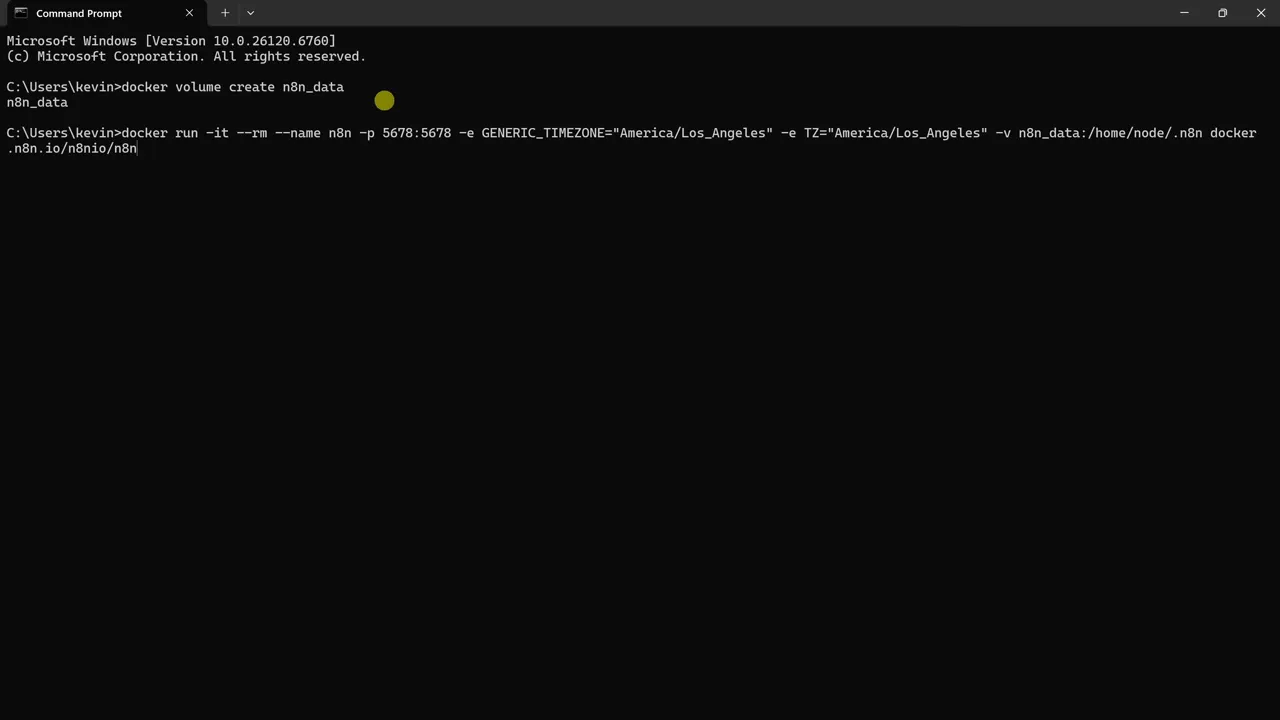
For this comparison, I self-hosted with Docker to show the full setup cost and complexity of wiring APIs together.
Self-hosting with Docker
- Create a Docker volume for persistent data.
- Run the n8n container with environment variables for your timezone.
- Open the n8n dashboard at the local address to create an account.
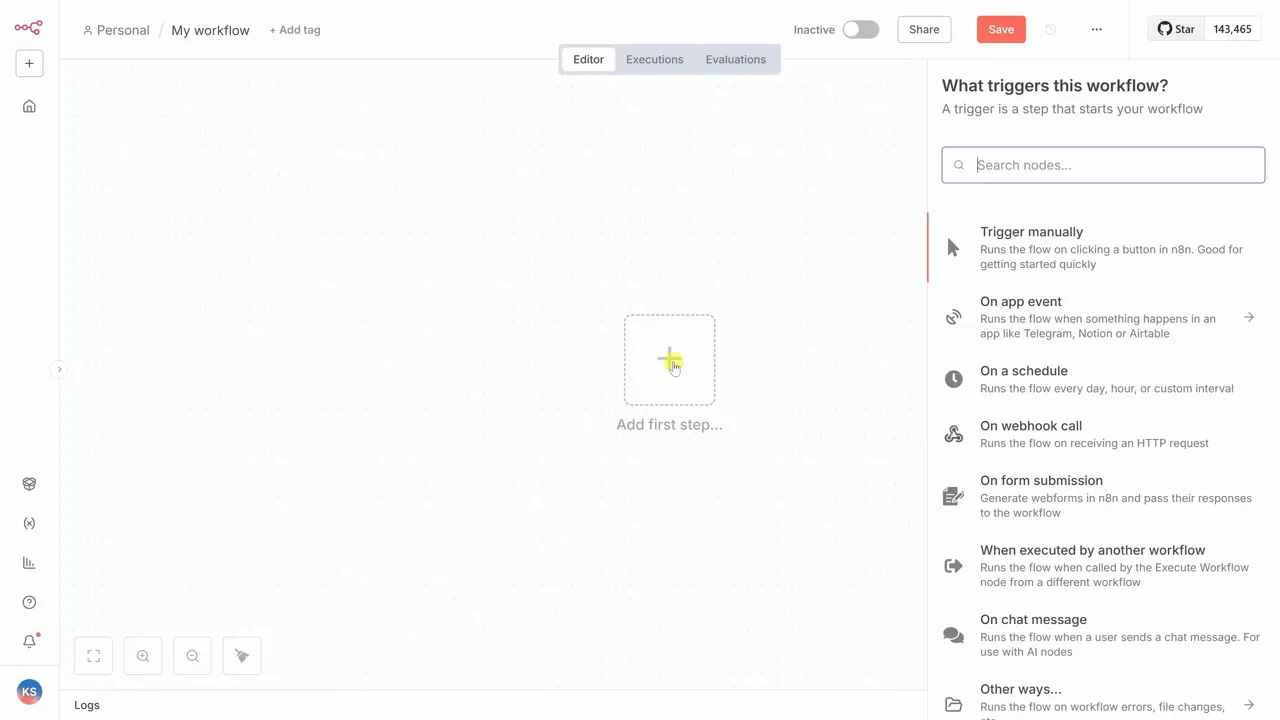
Once inside the editor, you build workflows node by node rather than describing the flow in plain language. This gives you more control, but it also means you must understand how each service sends, receives, and formats data.
Wiring YouTube in n8n
Unlike Zapier, n8n may require more hands-on credential setup. For YouTube, the workflow can involve several steps:
- Create a Google Cloud project.
- Enable the YouTube Data API v3.
- Configure an OAuth consent screen.
- Create Web application OAuth credentials with your n8n redirect URI.
- Add the Client ID and Client Secret to n8n.
After setting up credentials, add a schedule trigger node to poll for new uploads and a YouTube node to fetch videos. Because n8n’s YouTube node can return batches, you must filter carefully so the workflow does not repost older content.
Filtering recent videos
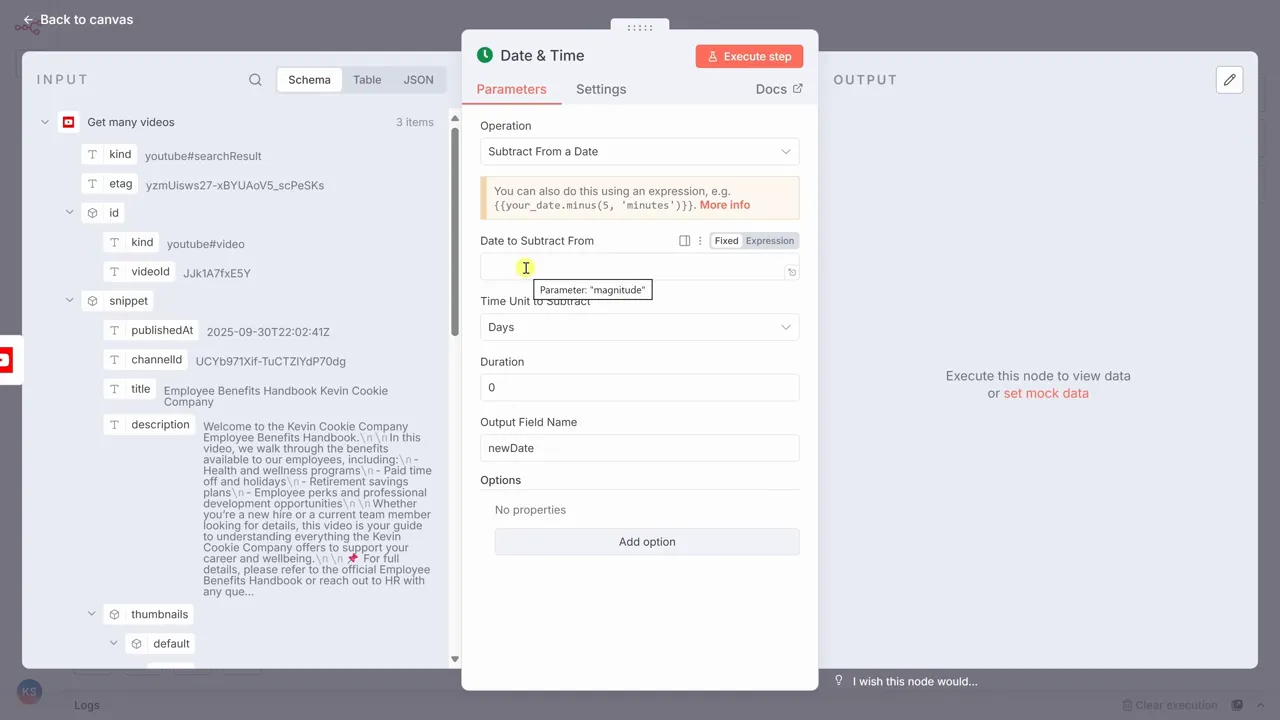
To ensure the workflow only posts new videos, I created a cutoff timestamp. I used n8n’s date and time node to subtract 24 hours from the current time. Then I used an If node to compare each video’s published date to the cutoff.
This step matters because social posting workflows should be repeatable. If the automation runs again after a server restart, schedule delay, or temporary API error, it should not publish the same video twice.
Warning: Never publish automatically without duplicate protection. Use a cutoff timestamp, stored video ID, spreadsheet log, or database record so the workflow can recognize content it has already processed.
AI integration in n8n
For AI, I used Google Gemini. Setting up Gemini required creating a Google Cloud project, enabling the Generative Language API, and copying an API key into n8n. I selected the Gemini 2.5 Flash model and crafted a prompt. One advantage of n8n is that I could drag and drop values from prior nodes directly into the prompt.
This flexibility is useful when you want the AI prompt to include structured context, such as the video title, description, URL, publish date, channel name, and preferred post format.

Posting to LinkedIn
Posting required creating a LinkedIn developer app. The steps included configuring OAuth 2 credentials and redirect URIs. Once I configured the LinkedIn Create Post node, it successfully published the content.
This part shows the main difference between the two tools. Zapier hides much of the developer setup behind managed app connections. n8n gives you more direct control, but you may need to work through each platform’s developer console yourself.

Platform comparison
The contrast between the two tools is clear in the setup experience.
Zapier:
- Describe the automation in a prompt and go.
- No developer console work required for many common apps.
- Great for beginners, creators, marketers, and operations teams.
- Better when you want a managed service that reduces setup time.
n8n:
- More manual wiring; you act more like a developer.
- Greater flexibility to transform data or handle complex logic.
- Ideal for teams that value control, customization, or data residency.
- Better when your workflow needs branching, custom APIs, self-hosting, or advanced data shaping.
Zapier is built around speed and convenience. n8n trades some of that simplicity for ownership, control, and workflow depth.
Pricing and cost considerations
Pricing should not be judged by subscription cost alone. The real cost of an automation platform includes execution volume, hosting, maintenance, support, team training, and the time spent fixing failed workflows.
Zapier pricing: Zapier commonly charges based on plan limits and task usage. This can be predictable for smaller workflows, but high-volume automations or multi-step processes can become more expensive as usage grows.
n8n pricing: n8n can be attractive for technical teams because it offers self-hosting options and more infrastructure control. However, self-hosting is not free in practice. You still need to consider server costs, security updates, monitoring, backups, and the time required to manage the system.
For a solo creator or small business, Zapier may save enough time to justify the managed cost. For a technical team with many custom workflows, n8n may offer better long-term control if the team can maintain it properly.
When to choose each platform
Choose Zapier if:
- You want to launch quickly without developer help.
- You value a fully managed service with predictable uptime.
- You need an easy way to use AI without provisioning keys.
- Your workflows use popular apps with strong pre-built integrations.
- Your team prefers guided setup over technical configuration.
Choose n8n if:
- You need deep control over data transformation.
- You must self-host due to compliance or security constraints.
- You enjoy building bespoke integrations.
- You have technical resources to manage credentials, APIs, and hosting.
- You need branching logic, custom endpoints, or advanced workflow design.
Note: If your workflows touch customer records, private business data, regulated data, or internal documents, consult your IT, security, or compliance team before choosing a managed or self-hosted platform.
Best practices for reliable workflows
- Design for idempotency: ensure workflows can be retried without duplicating data.
- Include logging and error handling. For n8n, add error workflows when a node fails.
- Provide the AI model with rich context to improve output relevance.
- Test end-to-end with staging credentials before pushing to production.
- Use naming conventions so each step is easy to understand later.
- Store important IDs, timestamps, or status logs when duplicate prevention matters.
- Review permissions regularly so apps only have the access they need.
Troubleshooting common issues
- OAuth popups missing: Check redirect URI exactness in the provider console.
- API quota errors: Monitor usage and request quota increases as needed.
- Duplicate posts: Use cutoff timestamps, stored IDs, or a log to process only new items.
- AI output quality: Update your prompt with specific tone, length, structure, and audience requirements.
- Broken field mapping: Re-test the trigger data and confirm the expected fields still exist.
- Workflow stops after a password change: Reconnect the affected app credentials.
- Unexpected formatting on LinkedIn: Test shorter posts and avoid unsupported markup.

Frequently Asked Questions
How do Zapier and n8n differ in technical knowledge required?
Zapier is designed for non-technical users and business teams. n8n expects more technical involvement, especially when you self-host, configure OAuth credentials, use API keys, or build custom logic between nodes.
Is it cheaper to use n8n self-hosted than Zapier?
It depends on your workflow volume and technical resources. Self-hosting can reduce some managed-platform costs, but you still need to pay for hosting, backups, monitoring, maintenance, updates, and developer time.
Can I use my preferred AI model with both platforms?
Yes, but the setup experience differs. Zapier offers built-in AI options and simplified integrations. n8n gives you more flexibility to connect AI models through API keys and custom HTTP requests, but you may need more configuration.
What are the advantages of self-hosting n8n?
Self-hosting gives you more control over infrastructure, data handling, custom integrations, and workflow behavior. The tradeoff is that you become responsible for security, updates, uptime, backups, and troubleshooting.
How do I prevent duplicate actions?
Use a cutoff timestamp, store the last processed item ID, or log completed actions in a spreadsheet or database. In n8n, you can compare each video’s published date against a rolling time window before allowing the post step to run.
Which platform is better for enterprise use?
Enterprises choose based on priorities. Zapier is strong when managed security, ease of use, and fast deployment matter. n8n is a strong fit when the organization needs deeper control, self-hosting, custom integrations, and technical ownership.
Choose the right platform
Both Zapier and n8n can automate your YouTube-to-LinkedIn workflow, but the paths differ. Zapier offers speed and simplicity for users who want to avoid manual maintenance and developer-heavy setup.
n8n is for teams that value ownership, custom integrations, advanced logic, and data control. It can be powerful, but you should be ready to manage credentials, hosting, API behavior, and workflow reliability.
Start by mapping your current bottlenecks and manual tasks. Once you have a clear plan, build a small prototype in your chosen platform to test the flow before a full rollout. If the prototype needs to be live quickly, start with Zapier. If it needs deep customization or self-hosting, start with n8n.
Sources
- Zapier — official platform information and automation product context
- n8n — official platform information and deployment context
- LinkedIn Developer Platform — developer app and OAuth setup context
- Large language model overview — background context for AI-assisted content generation
Last Updated on June 27, 2026 by Logan Carter

